내 맥북의 OS12 버전인데 더이상 업데이트가 안된다. 2016년 맥북프로인데 더이상 업데이트는 안된다고 한다. -.-;;;; 기기도 비싸면서. 얼마 안됐는데... 10년밖에 안됐는데 업데이트를... 기록 차원에서 이글을 작성함.
맥북 OS12에서 플러터 개발하면서 약간의 어려움
맥북 OS12에서 플러터 개발하면서 약간의 어려움이 있었다.
CocoaPods도 잘 설치가 안되서 클로드, chatgpt 도움을 받아가면 어찌어찌 설치하고 실제 프로젝트 빌드할때도 플러그인들이 더이상 os지원이 안되어서 플러그인 소스를 수정하고 빌드가 되었다.
일단 내 개발 환경을 기록 하고 기억 나는 부분만 적어 놓는다. 하도 이것 저것 명령어도 많이 쓰고 작업도 많이 해서 무엇으로 해결 됐는지 잘 기억도 안남, 인터넷과 생성형ai 도움으로 어쩌저찌 해결은 됐다.
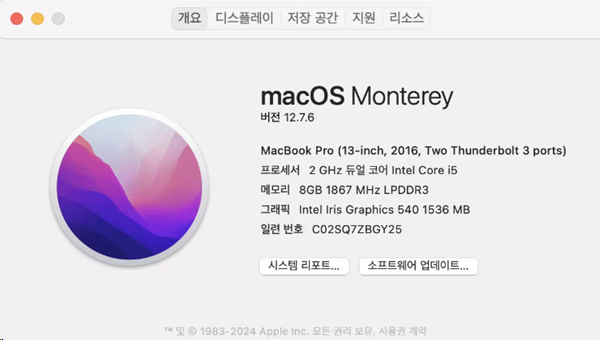
빌드시 flutter_inappwebview 패키지 관련 해서 에러가 나서 엄청 고생함
개발환경 알아보기
플러터 전체적인 상태 : flutter doctor
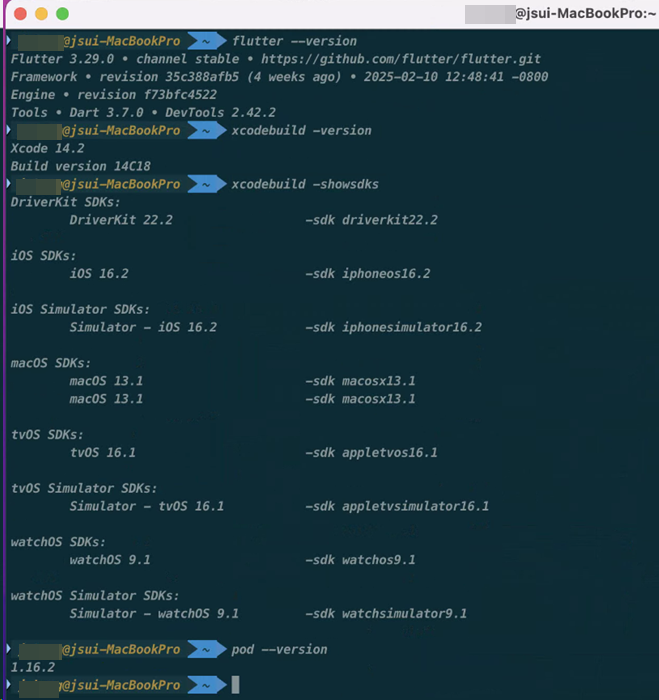
플러터 버젼 : flutter --version
XCode 버젼 : xcodebuild -version
iOS SDK 버젼 : xcodebuild -showsdks
CocoaPods 버젼 : pod --version
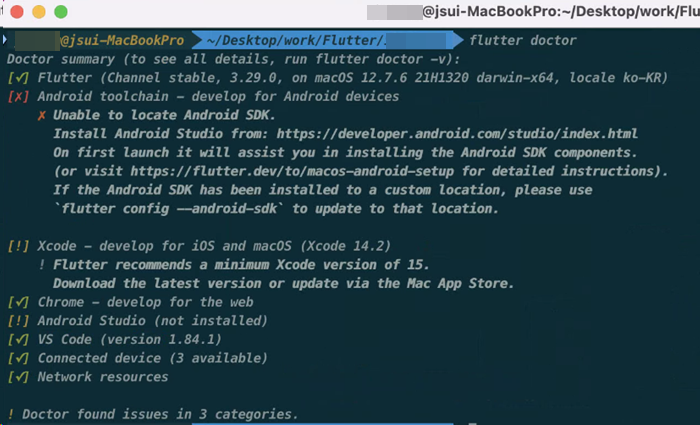
Doctor summary (to see all details, run flutter doctor -v):
[✓] Flutter (Channel stable, 3.29.0, on macOS 12.7.6 21H1320 darwin-x64, locale ko-KR)
[✗] Android toolchain - develop for Android devices
✗ Unable to locate Android SDK.
Install Android Studio from: https://developer.android.com/studio/index.html
On first launch it will assist you in installing the Android SDK components.
(or visit https://flutter.dev/to/macos-android-setup for detailed instructions).
If the Android SDK has been installed to a custom location, please use
`flutter config --android-sdk` to update to that location.
[!] Xcode - develop for iOS and macOS (Xcode 14.2)
! Flutter recommends a minimum Xcode version of 15.
Download the latest version or update via the Mac App Store.
[✓] Chrome - develop for the web
[!] Android Studio (not installed)
[✓] VS Code (version 1.84.1)
[✓] Connected device (3 available)
[✓] Network resources
! Doctor found issues in 3 categories.
---
플러터 버젼 : flutter --version
Flutter 3.29.0 • channel stable • https://github.com/flutter/flutter.git
Framework • revision 35c388afb5 (3 weeks ago) • 2025-02-10 12:48:41 -0800
Engine • revision f73bfc4522
Tools • Dart 3.7.0 • DevTools 2.42.2
---
XCode 버젼 : xcodebuild -version
Xcode Version 14.2 (14C18)
---
iOS SDK 버전 : xcodebuild -showsdks
DriverKit SDKs:
DriverKit 22.2 -sdk driverkit22.2
iOS SDKs:
iOS 16.2 -sdk iphoneos16.2
iOS Simulator SDKs:
Simulator - iOS 16.2 -sdk iphonesimulator16.2
macOS SDKs:
macOS 13.1 -sdk macosx13.1
macOS 13.1 -sdk macosx13.1
tvOS SDKs:
tvOS 16.1 -sdk appletvos16.1
tvOS Simulator SDKs:
Simulator - tvOS 16.1 -sdk appletvsimulator16.1
watchOS SDKs:
watchOS 9.1 -sdk watchos9.1
watchOS Simulator SDKs:
Simulator - watchOS 9.1 -sdk watchsimulator9.1
---
CocoaPods 버전 : pod --version
1.16.2
pubspc.yaml 파일 내용
### pubspec.yaml 파일 ###

name: 프로젝트명
description: "프로젝트명"
# The following line prevents the package from being accidentally published to
# pub.dev using `flutter pub publish`. This is preferred for private packages.
publish_to: 'none' # Remove this line if you wish to publish to pub.dev

# The following defines the version and build number for your application.
# A version number is three numbers separated by dots, like 1.2.43
# followed by an optional build number separated by a +.
# Both the version and the builder number may be overridden in flutter
# build by specifying --build-name and --build-number, respectively.
# In Android, build-name is used as versionName while build-number used as versionCode.
# Read more about Android versioning at https://developer.android.com/studio/publish/versioning
# In iOS, build-name is used as CFBundleShortVersionString while build-number is used as CFBundleVersion.
# Read more about iOS versioning at
# https://developer.apple.com/library/archive/documentation/General/Reference/InfoPlistKeyReference/Articles/CoreFoundationKeys.html
# In Windows, build-name is used as the major, minor, and patch parts
# of the product and file versions while build-number is used as the build suffix.
version: 1.0.0+1

environment:
  #sdk: ^3.6.1
  sdk: '>=3.0.0 <4.0.0'

# Dependencies specify other packages that your package needs in order to work.
# To automatically upgrade your package dependencies to the latest versions
# consider running `flutter pub upgrade --major-versions`. Alternatively,
# dependencies can be manually updated by changing the version numbers below to
# the latest version available on pub.dev. To see which dependencies have newer
# versions available, run `flutter pub outdated`.
dependencies:
  flutter:
    sdk: flutter

  #provider: ^6.0.5
  #http: ^1.1.0
  #flutter_secure_storage: ^8.0.0
  #shared_preferences: ^2.2.0

  provider: ^6.0.5
  #provider: 6.0.5
  http: ^1.1.0
  flutter_secure_storage: ^8.0.0
  shared_preferences: ^2.1.1  # 버전 다운그레이드

  cupertino_icons: ^1.0.5    # 안정적인 버전으로 조정

  #logger: ^1.4.0 #로거
  logging: ^1.2.0

  dio: ^5.4.0
  pretty_dio_logger: ^1.3.1  # Dio 로깅을 위한 패키지

  event_bus: ^2.0.0

  fl_chart: ^0.66.2

  #youtube_player_flutter: ^8.1.2
  youtube_player_flutter: ^9.1.1  #build 시 R8 에러 발생으로 업그레이드 함

  #flutter_inappwebview: ^6.0.0  #이것 에러나서 첨부 했는데 youtube_player_flutter: ^9.1.1 올려서 이것은 업그레이드 안해도됨, youtube_player_flutter에 종속된것

  # The following adds the Cupertino Icons font to your application.
  # Use with the CupertinoIcons class for iOS style icons.
  #cupertino_icons: ^1.0.8

dev_dependencies:
  flutter_test:
    sdk: flutter

  # The "flutter_lints" package below contains a set of recommended lints to
  # encourage good coding practices. The lint set provided by the package is
  # activated in the `analysis_options.yaml` file located at the root of your
  # package. See that file for information about deactivating specific lint
  # rules and activating additional ones.
  flutter_lints: ^5.0.0

# For information on the generic Dart part of this file, see the
# following page: https://dart.dev/tools/pub/pubspec

# The following section is specific to Flutter packages.
flutter:

  assets:
    - assets/images/

  # The following line ensures that the Material Icons font is
  # included with your application, so that you can use the icons in
  # the material Icons class.
  uses-material-design: true

  # To add assets to your application, add an assets section, like this:
  # assets:
  #   - images/a_dot_burr.jpeg
  #   - images/a_dot_ham.jpeg

  # An image asset can refer to one or more resolution-specific "variants", see
  # https://flutter.dev/to/resolution-aware-images

  # For details regarding adding assets from package dependencies, see
  # https://flutter.dev/to/asset-from-package

  # To add custom fonts to your application, add a fonts section here,
  # in this "flutter" section. Each entry in this list should have a
  # "family" key with the font family name, and a "fonts" key with a
  # list giving the asset and other descriptors for the font. For
  # example:
  # fonts:
  #   - family: Schyler
  #     fonts:
  #       - asset: fonts/Schyler-Regular.ttf
  #       - asset: fonts/Schyler-Italic.ttf
  #         style: italic
  #   - family: Trajan Pro
  #     fonts:
  #       - asset: fonts/TrajanPro.ttf
  #       - asset: fonts/TrajanPro_Bold.ttf
  #         weight: 700
  #
  # For details regarding fonts from package dependencies,
  # see https://flutter.dev/to/font-from-package
flutter_inappwebview 경로 확인
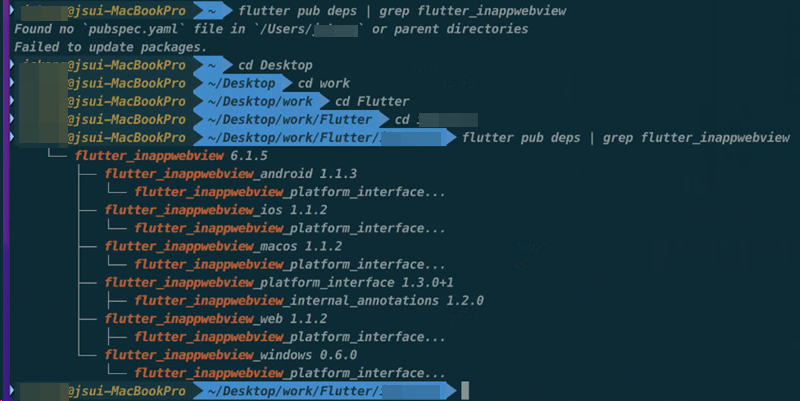
flutter_inappwebview pubspec.yaml에 없음
다음 명령어로 알아냄
flutter pub deps | grep flutter_inappwebview
└── flutter_inappwebview 6.1.5
├── flutter_inappwebview_android 1.1.3
│ └── flutter_inappwebview_platform_interface...
├── flutter_inappwebview_ios 1.1.2
│ └── flutter_inappwebview_platform_interface...
├── flutter_inappwebview_macos 1.1.2
│ └── flutter_inappwebview_platform_interface...
├── flutter_inappwebview_platform_interface 1.3.0+1
│ ├── flutter_inappwebview_internal_annotations 1.2.0
├── flutter_inappwebview_web 1.1.2
│ ├── flutter_inappwebview_platform_interface...
└── flutter_inappwebview_windows 0.6.0
└── flutter_inappwebview_platform_interface...
에러 내용
에러 내용

/Users/사용자id/.pub-cache/hosted/pub.dev/flutter_inappwebview_ios-1.1.2/ios/Classes/InAppWebView/InAppWebView.swift:492:17 Cannot find 'isInspectable' in scope

/Users/사용자id/.pub-cache/hosted/pub.dev/flutter_inappwebview_ios-1.1.2/ios/Classes/InAppWebView/InAppWebView.swift:537:43 Value of type 'WKPreferences' has no member 'shouldPrintBackgrounds'

/Users/사용자id/.pub-cache/hosted/pub.dev/flutter_inappwebview_ios-1.1.2/ios/Classes/InAppWebView/InAppWebView.swift:1300:17 Cannot find 'isInspectable' in scope

/Users/사용자id/.pub-cache/hosted/pub.dev/flutter_inappwebview_ios-1.1.2/ios/Classes/InAppWebView/InAppWebView.swift:1303:43 Value of type 'WKPreferences' has no member 'shouldPrintBackgrounds'

/Users/사용자id/.pub-cache/hosted/pub.dev/flutter_inappwebview_ios-1.1.2/ios/Classes/InAppWebView/InAppWebView.swift:495:25 'clearCache' is deprecated: Use InAppWebViewManager.clearAllCache instead.

/Users/사용자id/.pub-cache/hosted/pub.dev/flutter_inappwebview_ios-1.1.2/ios/Classes/InAppWebView/InAppWebView.swift:2906:38 'onFindResultReceived(activeMatchOrdinal:numberOfMatches:isDoneCounting:)' is deprecated: Use FindInteractionChannelDelegate.onFindResultReceived instead.
해결방법
에러난 InAppWebView.swift 파일을 열어서 iOS 16.4 부분의 기능을 주석 처리함, 다른곳도 비슷한 에러여서 주석 처리함
그주석처리후 빌드하니 정상적 작동함
// InAppWebView.swift


// 변경 전 (492-495줄 부근):
if #available(iOS 16.4, *) {
    isInspectable = settings.isInspectable
}
if #available(iOS 16.4, *) {
    configuration.preferences.shouldPrintBackgrounds = settings.shouldPrintBackgrounds
}

// 변경 후:
// iOS 16.4 기능은 현재 환경에서 사용 불가능하므로 해당 코드 제거 또는 주석 처리
// if #available(iOS 16.4, *) {
//     isInspectable = settings.isInspectable
// }
// if #available(iOS 16.4, *) {
//     configuration.preferences.shouldPrintBackgrounds = settings.shouldPrintBackgrounds
// }
관련된 다른글들 :
flutter 윈도우 작업 소스 맥북에서 빌드하기
flutter 소스를 맥북에서 빌드하기 위해 윈도우에서 작업한 플러터 소스를 맥북으로 옮겼는데 몇가기 문제가 발생하여 기록함 맥북에서 빌드하기 위해서는 기본적으로 XCode, CocoaPods는 이미 설치
dtbb.tistory.com


